


VLC Streamer
4.077.00 Reviews
App Specs
- Version
- 2.57 (3904)
- Updated On
- License
- $2.99
- Downloads
- 10,000+
- Developer
- Hobbyist Software Ltd
- Categories
- Video Players & Editors
- Platform
- Android
Screenshots
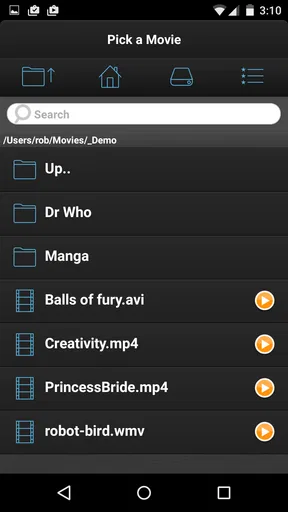
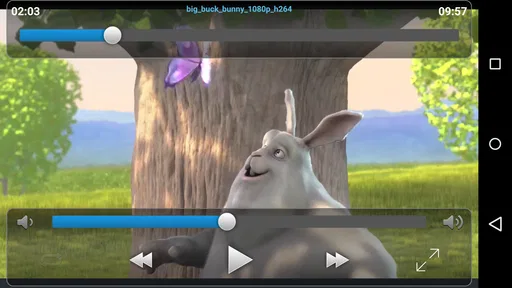

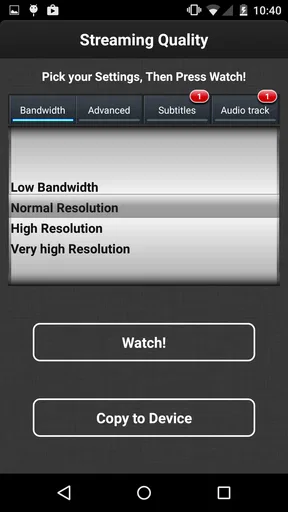
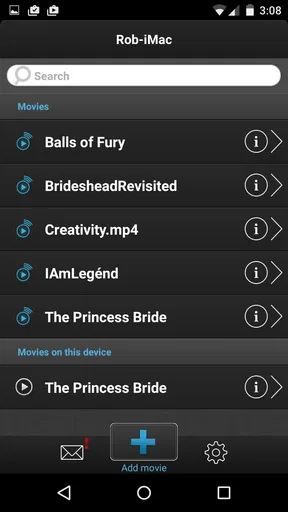
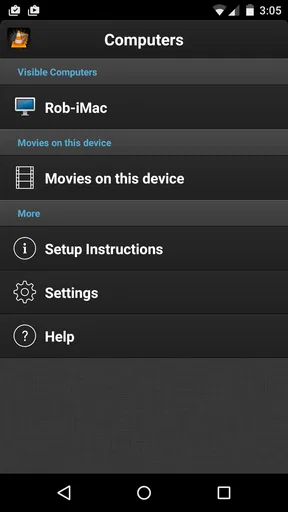
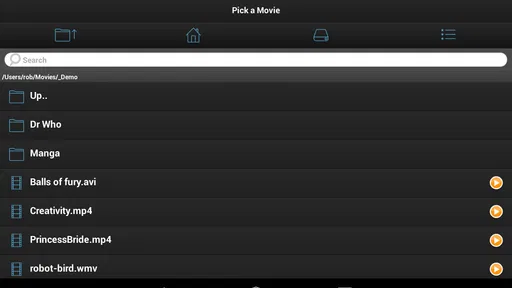
 Analysis by AppCompare
I like the idea behind VLC Streamer because it solves a very specific problem: keeping a movie on a computer while watching it on an Android device somewhere else in the house. In my experience, that can be more convenient than copying large files to a phone or tablet, especially when the computer already holds the video collection. This is a paid video player and editor app from Hobbyist Software Ltd, aimed at people who want a straightforward way to stream personal video around a home network.
The app costs $2.99, carries an Everyone age rating, and has reached over ten thousand installs. Its average score is 4.0 from more than five hundred ratings, with dozens of written reviews. Those figures suggest a useful but fairly focused tool rather than a universal media platform. I would recommend it to someone who understands the home-streaming setup and wants to watch existing files on Android. I would not choose it simply because I wanted a general-purpose player with every modern convenience built in.
What VLC Streamer is really for
The most important thing to understand is that this is not just another app for opening a video file already stored on your phone. Its appeal comes from streaming content from a computer to an Android device. That changes the everyday workflow: the computer remains the source, while the phone or tablet becomes the screen and playback controller.
A realistic example is an evening when the family computer is in a study, but I want to watch a film in the kitchen while preparing food. Instead of waiting for a transfer, I can use the computer as the library and the Android device as the viewing screen. The same arrangement can work when someone else needs the television, or when I want to continue watching from a room without moving the computer.
That convenience depends on the two devices being able to communicate properly. A home network that is poorly configured, crowded, or split into isolated guest and main connections can make the experience frustrating. The app is therefore best judged as part of a small home setup, not in isolation. If the computer and Android device cannot see each other, the player cannot compensate for that basic network problem.
The app belongs in the video players and editors category, although its practical identity is closer to a home video-streaming client. That distinction matters. Someone looking for editing tools, social publishing, screen recording, or a large online catalog is looking in the wrong place. VLC Streamer is about reaching personal video from another device.
Getting started without unnecessary confusion
My advice is to begin with one short, familiar video rather than a long high-quality film. A small test makes it easier to identify whether the issue is the network, the computer-side setup, the chosen file, or the Android device. Once that first playback works, moving on to larger files is much less stressful.
Worth Reading Before You Choose

EA SPORTS FC Mobile 26 Is a Bigger Football Game, but It Takes Time

Flipboard Shows What News Apps Must Do Beyond the Feed

Switching to Android Auto Means Rethinking Your Driving Routine

Google Calendar Makes a Crowded Week Easier to Manage

Ludo King Makes the Most of the Minutes Between Plans

Baby Panda World Brings Quick Play to Modern Phones, but Its Game Library Feels Busy
The computer should be awake and available for the entire viewing session. This is an easy detail to overlook when the goal is to watch from a sofa or bedroom. If the source machine sleeps, loses its network connection, or becomes unavailable, the Android player has no independent copy to continue from. That is the central trade-off: streaming saves storage and copying time, but it creates dependence on the source device.
I also prefer using a stable home connection rather than testing this through a guest network. Guest networks often separate devices for security, which is sensible for visitors but inconvenient for local streaming. When troubleshooting, I would first place both devices on the same ordinary home network, check that the computer is still running, and only then investigate video-specific problems.
The current version is 2.57 (3904), and the stated minimum operating system is Android 7.0. That makes the compatibility question relatively simple for many Android users, but I would still check the device itself before paying. A supported operating-system version does not automatically guarantee a smooth experience with every video file or every home network.
Where the simple design helps
VLC Streamer’s focused purpose is its biggest strength. There is less temptation to browse unrelated content, create an account for a media service, or manage another online library. I can think of it as a bridge between a computer and an Android screen. For a household with a well-organized local collection, that focus can feel refreshingly direct.
It is also useful when storage is limited. A large film does not need to be permanently copied to the phone before viewing. That can preserve space for photos, music, documents, and other apps. The compromise is that the video is not available when the computer or home network is unavailable, so this is not a replacement for downloading something before a flight or a trip.
Another practical benefit is avoiding a repeated transfer workflow. Copying a file can involve finding the right cable, locating a compatible folder, waiting for the transfer, and later deleting the duplicate. Streaming removes those steps for at-home viewing. For occasional use, that may be worth more than having a feature-rich standalone player.
Important trade-offs during playback
The quality of the experience depends on more than the app’s interface. The source computer has to read the file and send the video across the network, while the Android device receives and displays it. A demanding file may expose weaknesses in the computer, network, or device even when a smaller file works perfectly.
This is why I would not treat a failed playback attempt as proof that the app is unusable. I would test a different file, move closer to the home router, and make sure other heavy network activity is not taking place. A large download or several active streams can affect a setup that seems fine under lighter conditions.
There is also a privacy-related convenience here: the app’s basic purpose is local viewing of personal video rather than participation in a public content community. Still, local does not mean risk-free by definition. The computer, router, Android device, and any visible connection controls all matter. I would pay attention to which device is selected, whether the app is being used on the intended home network, and whether the computer remains accessible after viewing.
I would avoid making assumptions about permissions or data practices that are not visibly explained inside the app or its store materials. Instead, I would inspect the Android permission prompts during installation and use, read any privacy information presented by the developer, and decline optional access that is not needed for my own workflow. That is a better habit than assuming every streaming utility handles information in the same way.
Trust, controls, and user choices
For me, trust in a small utility comes from clear choices. Before using it regularly, I would check the Android permission screen, note whether a permission is required immediately or only when a particular action is attempted, and review the app’s settings for any device or connection options. If the app presents a computer-selection screen, I would verify that the chosen source is the one I actually intend to use.
I would also keep the home network boundary in mind. This is a tool for watching around the house, so I would avoid treating it as a reason to expose a computer or router configuration unnecessarily. If a setup asks me to change security settings broadly, I would stop and reconsider whether the convenience is worth weakening the rest of the network.
Account control is another point I would handle cautiously. I would not create an account merely out of habit unless the app clearly requires one for a function I need. If the app offers a way to use the local streaming workflow without extra registration, that is preferable for a simple household task. If account screens or connected services appear, I would read what they enable and remove access I no longer use.
These are not dramatic features, but they influence whether the app feels appropriate for a personal library. I want to know which computer is serving the video, which Android device is receiving it, and what I can switch off afterward. A focused local tool should fit into that mental model without making me surrender unnecessary control.
Three less obvious ways to use it well
First, I would use a short test clip as a permanent troubleshooting tool. Keeping one ordinary file available on the computer gives me a quick way to distinguish a connection problem from a file-specific problem. If the test clip plays but one particular film does not, I know where to focus instead of repeatedly changing network settings.
Second, I would organize the computer’s video folders before relying on the app for regular viewing. A neat structure with clear filenames reduces the time spent searching from the Android device. This sounds basic, but remote playback becomes much less pleasant when the source library is full of duplicate names, unfinished downloads, or files whose contents are unclear.
Third, I would treat the source computer as part of the viewing schedule. If I know I want to watch something later, I can leave the computer ready, prevent it from sleeping for that period, and close unrelated tasks that might compete for resources. This is more dependable than starting a film and discovering halfway through that the source machine has gone idle.
A fourth useful trade-off is choosing streaming for convenience but keeping a local copy only when mobility matters. At home, streaming avoids duplication. For travel, commuting, or places with unreliable connectivity, a downloaded file and a conventional offline player are clearly better. VLC Streamer is strongest when the viewing location changes but the source computer stays available.
How it compares with ordinary alternatives
The usual alternative is to copy videos directly to the Android device and play them with a local media player. That approach is more independent: once the file is copied, the computer can be turned off and the phone can be used anywhere. Its disadvantages are storage use, transfer time, and the need to manage duplicate files.
Another alternative is a subscription streaming service. Those services are easier for discovering licensed online content, but they do not automatically solve the problem of watching a personal file stored on a home computer. They can also introduce catalogs, accounts, and playback rules that are unrelated to this app’s narrow purpose.
A full home-media server may offer a richer library interface, remote access, user profiles, and broader device support. That can be a better choice for a large household collection or several regular viewers. The cost is more setup and more decisions. VLC Streamer makes more sense when I want a smaller, direct path from one computer to one Android screen without building an elaborate media system.
A standard Android video player is the better option when the files already live on the device or on removable storage. In that situation, adding a computer as a streaming source creates dependency without solving a real problem. The app earns its place only when the computer-based library is the convenient location for the videos.
Who should choose it, and who should skip it
I see this app working best for someone with a personal video collection on a computer, a compatible Android device, and a reasonably dependable home network. It is especially suitable for casual room-to-room viewing, conserving phone storage, and avoiding repeated cable transfers. The paid price is modest enough to consider if that specific workflow will be used often.
I would skip it if I mainly watch online services, need offline playback, want advanced editing, or expect the Android device to work independently from the computer. I would also hesitate if the home network is unreliable or if the computer is usually shut down. In those situations, a local player or a more complete media-server solution may be less frustrating.
The Everyone rating makes it broadly approachable from an age-classification perspective, but that does not remove the need for sensible household controls. Personal files, network access, and shared devices still deserve attention. I would make sure the app is installed on the intended device and that the selected source computer is not accidentally someone else’s machine.
My cautious verdict after using the workflow
VLC Streamer is a specialized convenience tool, not a complete entertainment platform. I appreciate that it targets one clear situation: watching computer-hosted video on Android without first filling the device with copies. When the network and source computer are ready, that can be pleasantly simple.
Its limitations are equally clear. Playback depends on the computer staying available, the network being cooperative, and the video fitting the capabilities of the setup. The app is less useful for travel, offline viewing, online discovery, or people who want editing and media-management features in one place.
Hobbyist Software Ltd has built something that makes sense for a particular household routine, and the 4.0 average from over five hundred ratings reflects a generally positive but not universal experience. I would recommend trying it when local home streaming is exactly the problem to solve, while checking the Android permission prompts, connection choices, and privacy information before making it part of a regular setup.
My final advice is simple: buy it for the workflow, not for the name alone. Test one small video, confirm that the computer and Android device can communicate, and decide whether avoiding transfers is worth depending on the home network. If that trade-off suits you, VLC Streamer can be a practical way to turn an Android screen into a remote window onto your own collection. If independence and offline access matter more, a conventional local player will be the wiser choice.
Pros
- Streams videos from your computer to your phone or tablet.
- Supports common video formats without requiring conversion in many cases.
- Playback can continue while using other apps with background audio support.
- Offers subtitle support for compatible video files.
- Useful for accessing a personal media library over a local network.
Cons
- Requires a computer-side helper application to stream content.
- Initial setup may be confusing for less technical users.
- Streaming quality depends heavily on Wi-Fi stability and network speed.
- May use significant battery during extended video playback.
- Some advanced VLC desktop features are unavailable in the mobile app.
FAQs for VLC Streamer
What is VLC Streamer and how does it work?
VLC Streamer lets you watch videos stored on a computer or local network device on an Android or iOS phone or tablet. You install the companion streamer software on the computer, select a video, and the computer converts and sends it to the mobile device. It is especially useful when you want to view large files without copying them directly to your phone.
Does VLC Streamer require a computer or can it play videos independently?
VLC Streamer is primarily designed to stream content from a computer, so it is not a completely standalone media player. Your computer must be switched on, connected to the same network in most setups, and running the required VLC Streamer helper application. If you want to play locally stored files without another device, a traditional mobile video player may be more convenient.
What video formats are supported by VLC Streamer?
VLC Streamer can handle many common video formats because the companion software converts the content before sending it to your mobile device. Compatibility may still depend on the original file, operating system, network conditions, and selected quality settings. If a video does not play correctly, updating the helper software or choosing a different conversion quality can often resolve the problem.
Can VLC Streamer be used over mobile data or only Wi-Fi?
The application is generally most practical over a reliable Wi-Fi connection, particularly when streaming high-resolution videos. Streaming over mobile data may be possible in certain network configurations, but it can consume a large amount of data and may require additional setup, such as remote access to your home network. For smoother playback and lower data costs, use VLC Streamer on the same local network.
Is VLC Streamer free, and are there any important limitations?
Availability, pricing, and included features can vary between the Android and iOS versions, so users should check the current store listing before downloading. The main limitation is that streaming depends on the computer helper application, network quality, and real-time video conversion. Older computers may struggle with demanding files, while weak Wi-Fi can cause buffering, connection drops, or reduced picture quality.


